The Forums have a new look coming Monday, February 7th!

The Forums have a new look coming Monday, February 7th!

Alicia MarksPro Member
Fort Worth, TX · Member since 2020 · 1k+ posts · 2k+ votes

Good news! There are some awesome improvements to the forums that allow for an easier user experience. Keep reading for the highlights.
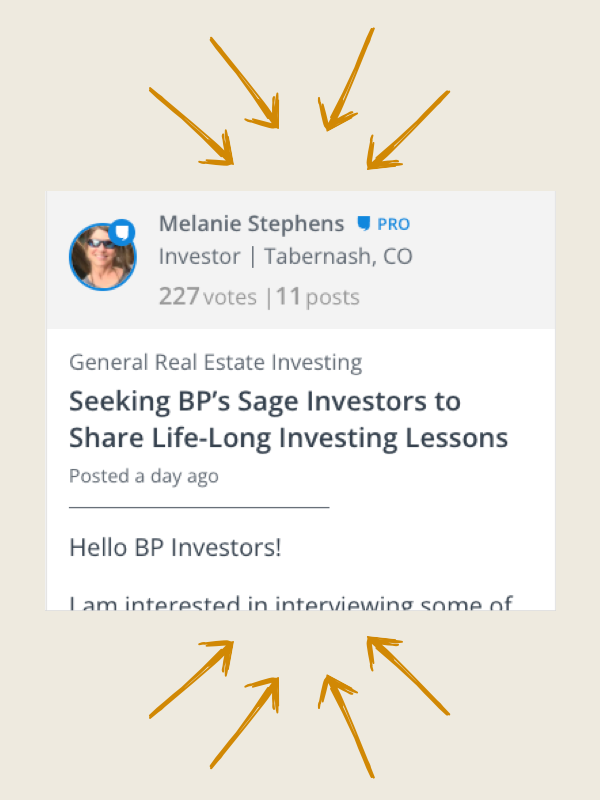
Easily follow discussions with a simpler design. Plus, users stats are more predominantly displayed so you can quickly identify experts.

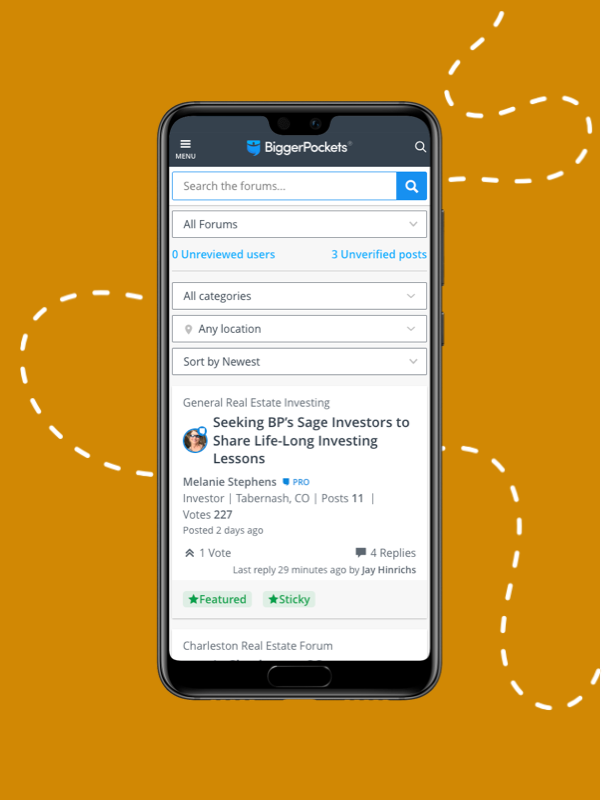
We finally optimized for mobile usability! This way you can stay involved on the go.

Note: the iPhone and Android apps have not been updated, you must visit biggerpockets.com/forums to see the improved mobile experience
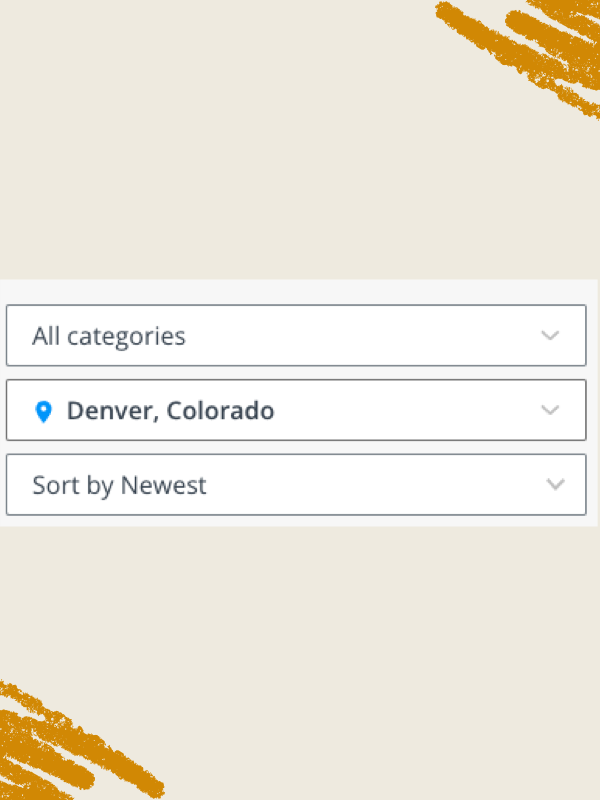
Now tag your topic posts with locations that can be easily found via the location filter at the top of your forums experience. Find what you’re looking for faster.

A clean new design with all the most relevant information prominently displayed. This makes the conversation amongst BiggerPockets members that much easier to read!

63Reply
562 views

Most Popular Reply

Investor · MI · Member since 2015 · 227 posts · 478 votes
4y
Every time the forums get "easier to use" I have a harder time using them....
See this reply in the discussion

214 Replies

Jump to latestLatest
  • Austin, TX · Member since 2019 · 5k+ posts · 5k+ votes
    4y

    Hi everyone,

    Since the forum is fluxing in design right now, I did a mockup of the screen just after login, for discussion.

    I did away with the ghost of a post words at the bottom of each post and rearranged OP with responded pics, and added some stats, as well as a jump to last post link.

    My thought was to make it tighter with less scrolling.

    I understand there is a button for compact view which will hide the "ghost of a post" text--but I do not see that button on my Win-7 and Win-8 machines on Chrome.

    Does anyone think the ghost of a post words at the bottom of each post at this point are useful.

    Personally I don't use them.

    Just my 2 cents.

    Note: Right Click --Open Image in another tab increases it's size.

  • Austin, TX · Member since 2019 · 5k+ posts · 5k+ votes
    4y

    The reason the right click is coming up so artifacted (unclear) is because the server is sending it to you at image quality 55 vs 100%.

    Maybe it works for other pics, but these pings, this is the best they will look at 55.

    I suppose it save bandwidth and $$$ over time though.

  • Greg ScottPro Member
    Rental Property Investor · SE Michigan · Member since 2014 · 4k+ posts · 6k+ votes
    4y
    Quote from @Nate Slappey III:

    @Henry Clark Thanks for the feedback, I appreciate it.....not sure I can help with the cherries but ill see 😂

    Nate:

    I have a new complaint about the forums...

    I am seeing posts from PRO members that only PRO members can respond to, and I am not PRO. 

    I just spent a lot of time crafting a usable response to a PRO member and, upon posting, was denied posting it because I am not PRO.  I have 20x the experience than he does and could have added a lot of value to him.  Because of this procedural misstep, BP is failing in its primary mission.

    Please hide "PRO" questions for which experienced people that cannot respond.

    I used to be a PRO member until they jacked the price.

    I have more experience than most PRO members.

    Now I can see PRO member questions, and despite spending a long time crafting responses, all my posts get rejected.

  • Bruce WoodruffPro Member
    Contractor/Investor/Consultant · San Diego / Phoenix · Member since 2021 · 12k+ posts · 15k+ votes
    4y

    I would still suggest that when you click on a link to a post that you are named in...that it should scroll down to that particular post.....

  • Realtor | Product Manager at BiggerPockets · Metro Detroit, MI · Member since 2022 · 119 posts · 127 votes
    4y
    Quote from @Greg Scott:
    Quote from @Nate Slappey III:

    @Henry Clark Thanks for the feedback, I appreciate it.....not sure I can help with the cherries but ill see 😂

    Nate:

    I have a new complaint about the forums...

    I am seeing posts from PRO members that only PRO members can respond to, and I am not PRO. 

    I just spent a lot of time crafting a usable response to a PRO member and, upon posting, was denied posting it because I am not PRO.  I have 20x the experience than he does and could have added a lot of value to him.  Because of this procedural misstep, BP is failing in its primary mission.

    Please hide "PRO" questions for which experienced people that cannot respond.

    I used to be a PRO member until they jacked the price.

    I have more experience than most PRO members.

    Now I can see PRO member questions, and despite spending a long time crafting responses, all my posts get rejected.

     @Greg Scott can you link me to the thread you're talking about? the forums should be available in full to all users no matter the membership status so this may be a bug the team needs to look into. Apologies for the inconvience.

    BiggerPockets
  • Realtor | Product Manager at BiggerPockets · Metro Detroit, MI · Member since 2022 · 119 posts · 127 votes
    4y
    Quote from @Bruce Woodruff:

    I would still suggest that when you click on a link to a post that you are named in...that it should scroll down to that particular post.....

     @Bruce Woodruff are you referring to coming from email or notifications on the site? i know we fixed this for notifications on the site but may have missed coming from email.

    BiggerPockets
  • Greg ScottPro Member
    Rental Property Investor · SE Michigan · Member since 2014 · 4k+ posts · 6k+ votes
    4y

    @Nate Slappey III

    Unfortunately, I cannot search for one of these posts and the ones that I posted too are long ago moved out of "unanswered" which is how I stumbled upon them.

    Before the update to the Forums, I used to see the occasional "You can't read this because you are not PRO" post.  Now I am apparently allowed to read the post, write a response, and it is only when I try to post the reply that I get an error message.

  • Realtor | Product Manager at BiggerPockets · Metro Detroit, MI · Member since 2022 · 119 posts · 127 votes
    4y

    @Greg Scott gotcha, i understand the frustration. the team and I are looking into things. Thanks for the feedback

    BiggerPockets
  • Bruce WoodruffPro Member
    Contractor/Investor/Consultant · San Diego / Phoenix · Member since 2021 · 12k+ posts · 15k+ votes
    4y
    Quote from @Nate Slappey III:
    Quote from @Bruce Woodruff:

    I would still suggest that when you click on a link to a post that you are named in...that it should scroll down to that particular post.....

     @Bruce Woodruff are you referring to coming from email or notifications on the site? i know we fixed this for notifications on the site but may have missed coming from email.


     from email.....

    None of my business I suppose, but it shouldn't take your IT guys 4 months to fix something like this.....right?

  • Realtor | Product Manager at BiggerPockets · Metro Detroit, MI · Member since 2022 · 119 posts · 127 votes
    4y
    Quote from @Bruce Woodruff:
    Quote from @Nate Slappey III:
    Quote from @Bruce Woodruff:

    I would still suggest that when you click on a link to a post that you are named in...that it should scroll down to that particular post.....

     @Bruce Woodruff are you referring to coming from email or notifications on the site? i know we fixed this for notifications on the site but may have missed coming from email.


     from email.....

    None of my business I suppose, but it shouldn't take your IT guys 4 months to fix something like this.....right?

    @Bruce Woodruff interesting...it appears to be working for me. Are you clicking the green "view mention" button in the email? 

    when you click the post title it just takes you to the post but when you click "view mention" it should take you to that specific mention. 

    if that isnt the case with you then let me know because we may have a bug. 

    BiggerPockets
  • Bruce WoodruffPro Member
    Contractor/Investor/Consultant · San Diego / Phoenix · Member since 2021 · 12k+ posts · 15k+ votes
    4y
    Quote from @Nate Slappey III:
    Quote from @Bruce Woodruff:
    Quote from @Nate Slappey III:
    Quote from @Bruce Woodruff:

    I would still suggest that when you click on a link to a post that you are named in...that it should scroll down to that particular post.....

     @Bruce Woodruff are you referring to coming from email or notifications on the site? i know we fixed this for notifications on the site but may have missed coming from email.


     from email.....

    None of my business I suppose, but it shouldn't take your IT guys 4 months to fix something like this.....right?

    @Bruce Woodruff interesting...it appears to be working for me. Are you clicking the green "view mention" button in the email? 

    when you click the post title it just takes you to the post but when you click "view mention" it should take you to that specific mention. 

    if that isnt the case with you then let me know because we may have a bug. 


     Hi Nate - This morning it is hit and miss. This time with your post, I clicked on the green and it took me right to your post. The other times this morning it took me to the first post in the thread and I had to scroll down.

Join the conversationCreate a free account to reply, vote on answers and follow this thread.